Connect your laptop or PC to your TV
June 11, 2026
  • Read Ecopy
  • Circulation
  • Advertise
  • Careers
  • About Us
  • Contact Us
Android AppiPhone AppArattai
Organiser
  • ‌
  • Bharat
    • Assam
    • Bihar
    • Chhattisgarh
    • Jharkhand
    • Maharashtra
    • View All States
  • World
    • Asia
    • Europe
    • North America
    • South America
    • Africa
    • Australia
  • Editorial
  • International
  • Opinion
  • RSS @ 100
  • More
    • Op Sindoor
    • Analysis
    • Sports
    • Defence
    • Politics
    • Business
    • Economy
    • Culture
    • Special Report
    • Sci & Tech
    • Entertainment
    • G20
    • Azadi Ka Amrit Mahotsav
    • Vocal4Local
    • Web Stories
    • Education
    • Employment
    • Books
    • Interviews
    • Travel
    • Law
    • Health
    • Obituary
  • Subscribe
    • Subscribe Print Edition
    • Subscribe Ecopy
    • Read Ecopy
  • ‌
  • Bharat
    • Assam
    • Bihar
    • Chhattisgarh
    • Jharkhand
    • Maharashtra
    • View All States
  • World
    • Asia
    • Europe
    • North America
    • South America
    • Africa
    • Australia
  • Editorial
  • International
  • Opinion
  • RSS @ 100
  • More
    • Op Sindoor
    • Analysis
    • Sports
    • Defence
    • Politics
    • Business
    • Economy
    • Culture
    • Special Report
    • Sci & Tech
    • Entertainment
    • G20
    • Azadi Ka Amrit Mahotsav
    • Vocal4Local
    • Web Stories
    • Education
    • Employment
    • Books
    • Interviews
    • Travel
    • Law
    • Health
    • Obituary
  • Subscribe
    • Subscribe Print Edition
    • Subscribe Ecopy
    • Read Ecopy
Organiser
  • Home
  • Bharat
  • World
  • Operation Sindoor
  • Editorial
  • Analysis
  • Opinion
  • Culture
  • Defence
  • International Edition
  • RSS @ 100
  • Magazine
  • Read Ecopy
Home Bharat

Connect your laptop or PC to your TV

Connect your laptop or PC to your TVAnoop VermaOur laptops are usually the repositories of all our favourite videos and pictures, but watching these on HDTV, with much larger screen, can be lot more fun. The YouTube videos will definitely seem much more engrossing if they are being watched on the broad TV screen.

Archive ManagerArchive Manager
Sep 11, 2012, 06:55 pm IST
in Bharat
Follow on Google News
FacebookTwitterWhatsAppTelegramEmail

 Anoop Verma

$img_titleOur laptops are usually the repositories of all our favourite videos and pictures, but watching these on HDTV, with much larger screen, can be lot more fun. The YouTube videos will definitely seem much more engrossing if they are being watched on the broad TV screen. It is pretty easy to connect the laptop to the TV; you don’t need to download any software. The right kind of cable will serve the purpose in most cases. Here is a quick overview of the ways by which you can connect your laptop to your TV and bring improvement to your video and picture viewing experience:

S-Video cable: If you have purchased a TV during the last three or four years, chances are that it has a S-Video Port. A S-Video Cable is very cheap, from the grey market you could get it for as less as Rs 50 or Rs. 100. Once you have the cable, just connect one end to your laptop and the other to TV. That’s it— the pictures and videos from your laptop can now be viewed on the TV screen. However, there is the possibility of one glitch, because the S-Video Cables come with two types of pins – 4-pin, and the 7-pin. Majority of the laptops are equipped with 7-pin S-Video Port, so if your TV has a 4-pin port, the system will not work.

VGA cable: In case you own a HDTV, you could opt for the VGA Cable for connecting with laptop. Most HDTV models these days are sold with VGA cabling, so chances are that you already have the cable. Even if you don’t have it, you can get one at rather cheap price, as is the case with S-Video. The main advantage of VGA connection is that it offers a much better video and audio quality. The regular TVs don’t have a VGA Port; this is an exclusive feature of HDTV models. If your TV does not have a VGA Port, you can go in for a VGA Converter Box, which can take the VGA signal and convert it into S-Video.

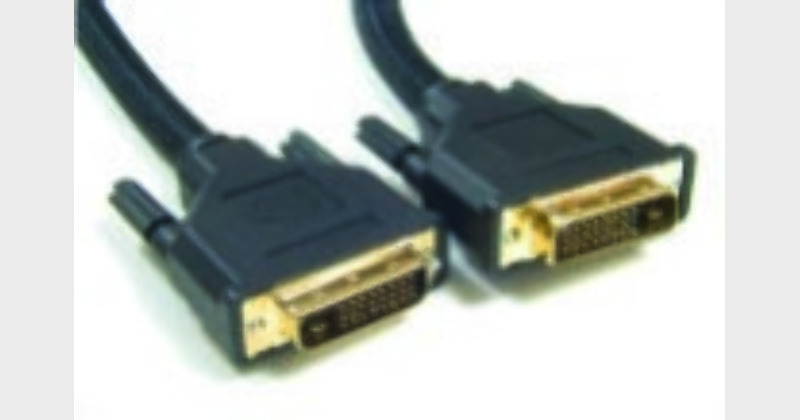
DVI: The full form of DVI is Digital Visual Interface. As it is “digital” you can expect a much better quality as compared to what you would get from S-Video or VGA. But the thing is that to use the DVI system, your computer needs to have a DVI Port, and your TV needs to be HDTV. So we are looking at pretty high-end systems. Also, the cable is not cheap. Even in grey market, you won’t be able to get it for less than Rs 3,000. Branded cables might be much costlier than that.

HDMI: Finally there is the HDMI route for connecting your TV to your laptop. This kind of connectivity will offer the best results in terms of video and audio output. The quality is much better than what you can have from S-Video, VGA or DVI. However, the problem is that none of the computers have HDMI Port. So the best thing you can do is connect your laptop to the HDTV through the DVI route. A DVI Cable will work, as HDMI is compatible with DVI.

Connect wirelessly: It is also possible for you to do away with wires while connecting your laptop with your HDTV. These days you can get hold of Q-Waves Wireless USB AV kit for less than Rs 7,000. The receiver has to be plugged into the HDMI or VGA Port in your HDTV. The range is around 10 metres, so the system will work only in your house. It is not as if you can broadcast the signal to the entire neighbourhood. In addition to the ones listed in this article, there are many other wireless or wired connectivity options that you can explore.


ShareTweetSendShareSend
✮ Subscribe Organiser YouTube Channel. ✮
✮ Join Organiser's WhatsApp channel for Nationalist views beyond the news. ✮
Previous News

Interlocutors? report presents only the views of the separatists

Next News

Armed forces suffering from UPA indecision

Related News

(Left) Six Naga Civilians who were killed (Right)Hundreds of grief-stricken people at the Jawaharlal Institute of Medical Sciences (JNIMS) in Imphal East, where the mortal remains were taken to the mortuary

Tension Grips Manipur: Police recover mortal remains of 6 abducted Nagas killed by Kukis; UNC calls for shutdown

PM Narendra Modi addressing the NDA meeting

‘The problem was Congress, not Hindus’: PM Modi’s blistering attack, lists India’s milestones in last 12 years

Leader of Opposition R. Ashoka files complaint with Karnataka governor over scam in awarding tender for waste management

Karnataka Garbage Scam: BJP alleges Rs 36,000-crore of scandal, seeks CBI probe; Files complaint to governor

Assam: Auto driver Monowar Hussain arrested for molesting, attempting to rape tribal woman passenger in Guwahati

The world recognises unprecedented growth in digital infrastructure during the 12 years of Modi's government

12 Years of Modi Government: How India built one of the world’s largest digital public infrastructure ecosystems

The image of alleged "Kolkotta Bayee" Jewel King living at Pathanamthitta

Keralam: WhatsApp status reveals illegal Bangladeshi who lived in Pathanamthitta for five years as ‘Kolkotta Bayee’

Load More

Latest News

(Left) Six Naga Civilians who were killed (Right)Hundreds of grief-stricken people at the Jawaharlal Institute of Medical Sciences (JNIMS) in Imphal East, where the mortal remains were taken to the mortuary

Tension Grips Manipur: Police recover mortal remains of 6 abducted Nagas killed by Kukis; UNC calls for shutdown

PM Narendra Modi addressing the NDA meeting

‘The problem was Congress, not Hindus’: PM Modi’s blistering attack, lists India’s milestones in last 12 years

Leader of Opposition R. Ashoka files complaint with Karnataka governor over scam in awarding tender for waste management

Karnataka Garbage Scam: BJP alleges Rs 36,000-crore of scandal, seeks CBI probe; Files complaint to governor

Assam: Auto driver Monowar Hussain arrested for molesting, attempting to rape tribal woman passenger in Guwahati

The world recognises unprecedented growth in digital infrastructure during the 12 years of Modi's government

12 Years of Modi Government: How India built one of the world’s largest digital public infrastructure ecosystems

The image of alleged "Kolkotta Bayee" Jewel King living at Pathanamthitta

Keralam: WhatsApp status reveals illegal Bangladeshi who lived in Pathanamthitta for five years as ‘Kolkotta Bayee’

Following TMC’s defeat in 2026 West Bengal Assembly election, speculation grew that its MPs were moving towards the NDA under BJP pressure

Why TMC MPs are looking towards the NDA: Examining the electoral arithmetic behind the political shift

Father dies on the day of daughter's Nikah over dispute over Mehar amount in Uttarakhand

Uttarakhand: Bride’s father dies of heart attack amid pressure and dispute over mehar amount in nikah

India has been transformed by major advances in digital governance, financial inclusion, and global influence under Modi govt

India After 12 Years of Modi: A record, revolution and remaining challenges

Will CM Joseph Vijay preserve Tamil Nadu’s priceless temple heritage as artefacts decay in Egmore museum

Load More
  • Privacy
  • Terms
  • Cookie Policy
  • Refund and Cancellation
  • Delivery and Shipping

© Bharat Prakashan (Delhi) Limited.
Tech-enabled by Ananthapuri Technologies

  • Home
  • Search Organiser
  • Bharat
    • Assam
    • Bihar
    • Chhattisgarh
    • Jharkhand
    • Maharashtra
    • View All States
  • World
    • Asia
    • Africa
    • North America
    • South America
    • Europe
    • Australia
  • Editorial
  • Operation Sindoor
  • Opinion
  • Analysis
  • Defence
  • Culture
  • Sports
  • Business
  • RSS @ 100
  • Entertainment
  • More ..
    • Sci & Tech
    • Vocal4Local
    • Special Report
    • Education
    • Employment
    • Books
    • Interviews
    • Travel
    • Health
    • Politics
    • Law
    • Economy
    • Obituary
  • Subscribe Magazine
  • Read Ecopy
  • Advertise
  • Circulation
  • Careers
  • About Us
  • Contact Us
  • Policies & Terms
    • Privacy Policy
    • Cookie Policy
    • Refund and Cancellation
    • Terms of Use

© Bharat Prakashan (Delhi) Limited.
Tech-enabled by Ananthapuri Technologies