TECH VIEW
June 10, 2026
  • Read Ecopy
  • Circulation
  • Advertise
  • Careers
  • About Us
  • Contact Us
Android AppiPhone AppArattai
Organiser
  • ‌
  • Bharat
    • Assam
    • Bihar
    • Chhattisgarh
    • Jharkhand
    • Maharashtra
    • View All States
  • World
    • Asia
    • Europe
    • North America
    • South America
    • Africa
    • Australia
  • Editorial
  • International
  • Opinion
  • RSS @ 100
  • More
    • Op Sindoor
    • Analysis
    • Sports
    • Defence
    • Politics
    • Business
    • Economy
    • Culture
    • Special Report
    • Sci & Tech
    • Entertainment
    • G20
    • Azadi Ka Amrit Mahotsav
    • Vocal4Local
    • Web Stories
    • Education
    • Employment
    • Books
    • Interviews
    • Travel
    • Law
    • Health
    • Obituary
  • Subscribe
    • Subscribe Print Edition
    • Subscribe Ecopy
    • Read Ecopy
  • ‌
  • Bharat
    • Assam
    • Bihar
    • Chhattisgarh
    • Jharkhand
    • Maharashtra
    • View All States
  • World
    • Asia
    • Europe
    • North America
    • South America
    • Africa
    • Australia
  • Editorial
  • International
  • Opinion
  • RSS @ 100
  • More
    • Op Sindoor
    • Analysis
    • Sports
    • Defence
    • Politics
    • Business
    • Economy
    • Culture
    • Special Report
    • Sci & Tech
    • Entertainment
    • G20
    • Azadi Ka Amrit Mahotsav
    • Vocal4Local
    • Web Stories
    • Education
    • Employment
    • Books
    • Interviews
    • Travel
    • Law
    • Health
    • Obituary
  • Subscribe
    • Subscribe Print Edition
    • Subscribe Ecopy
    • Read Ecopy
Organiser
  • Home
  • Bharat
  • World
  • Operation Sindoor
  • Editorial
  • Analysis
  • Opinion
  • Culture
  • Defence
  • International Edition
  • RSS @ 100
  • Magazine
  • Read Ecopy
Home Bharat

TECH VIEW

You don?t need to be a wizard with computers and software to create collages. All it takes is a few clicks of mouse to come up with collages in every imaginable shape and with any number of pictures.

Archive ManagerArchive Manager
Jan 8, 2012, 12:17 pm IST
in Bharat
Follow on Google News
FacebookTwitterWhatsAppTelegramEmail

It is easy to create collages?

By Anoop Verma
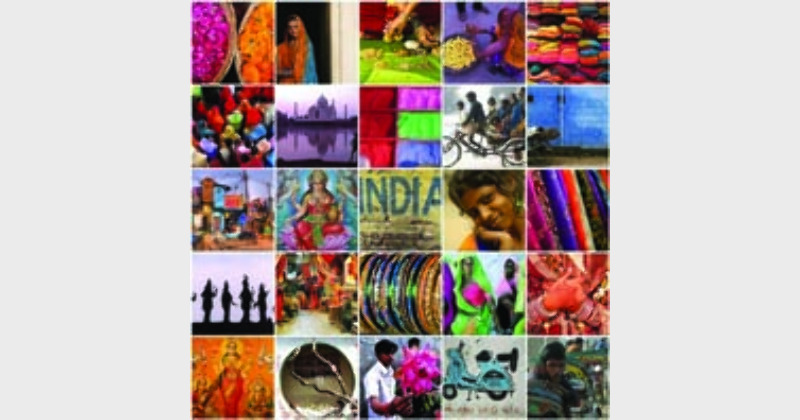
$img_titleYou don’t need to be a wizard with computers and software to create collages. All it takes is a few clicks of mouse to come up with collages in every imaginable shape and with any number of pictures. With a little bit of instructions anyone can churn out collages with Picasa, the user-friendly software from Google. As Picasa is a very efficient photo-editing tool, it can also be used to enhance the beauty of your pictures. Here is the list of steps for making collages with Picasa:

1.    Point your browser at: http://picasa.google.com. Currently Picasa 3.8 is available for download. Click on the blue download button in the screen. In case, you already have Picasa in your system, you can skip this step.

2.    Once it is installed in your computer, Picasa will automatically import and categorise the pictures that you have. When you start the application, you will find File, Edit, View, Folder, Picture, Create, Tools and Help menu items listed on the top.

3.    At the bottom of the Picasa screen there is the “Collage” button, click on it to open the “Make a Collage” window. It is also possible for you to create a collage of pictures in a folder or album by clicking the Create Photo Collage button located in the folder or album header.

4.    Picassa 3.8 offers six types of collages  – Picture pile, Mosaic, Frame mosaic, Grid, Contact sheet, and Multiple exposure. Anyone of these collage types can be chosen through the dropdown list in the Settings tab, which lies at the left side of the screen.

5.    Along with Collage types, the Settings tab also offers a range of options that you can use to control the eventual shape of your collage. The options are self-descriptive. For instance, we have Grid, Background, Page format, Orientation, etc.

6.    During the creation of the collage, if you want to add more pictures, you can use the Clips tab. The folder of the pictures that you have been working with are already available under the Clips tab. Just select the picture of your choice and click on the “+” button to add them to the collage. If you want to remove the images, use the “X” button.

7.    After the work has been created to your liking, you can click on the Create Collage button, to save the new picture. Alternatively, you can also use the Desktop Background button to create the collage and set it automatically as your computer desktop image.

If you would rather avoid downloading new software into your computer, you can still create a collage through a website like Photovisi (http://www.photovisi.com). In fact, there are quite a few websites on the Internet that can be used for making collages, but Photovisi happens to be one of the most popular. Primarily because it is easy to use and it has a large variety of templates. It is also free.

On the Phtovisi home page there is a button saying: Click here to start. In the new page that opens there are nine sample collages listed in an orderly format. There is also a vertical column on the left side of the page where different categories of templates are listed. For instance, if your collage is about wedding pictures, then you can click on the “wedding button.” If you are making holiday, fun or abstract collage then click on their respective buttons. A total of 15 buttons are listed.

After this you can go through an easy step-by-step process to create the collage of your choice. Once the collage is ready, you can save it in your PC or even upload it directly to Facebook. ?


ShareTweetSendShareSend
✮ Subscribe Organiser YouTube Channel. ✮
✮ Join Organiser's WhatsApp channel for Nationalist views beyond the news. ✮
Previous News

Marriage is a duty, not entertainment?

Next News

REPORT-1

Related News

POJK Burns (This is an AI generated image)

POJK Boils Over: Rs 1 crore bounty on JAAC leaders as anti-government protests intensify

NSE has announced that 10 per cent of its annual CSR corpus will be routed through the Social Stock Exchange

NSE to route 10 per cent of CSR corpus through Social Stock Exchange, sets new benchmark for impact funding

Organisational Secretary of Bharatiya Mazdoor Sangh (BMS), Bojji Surendran addressing the gathering at the 114th Session of the International Labour Conference (ILC) of the International Labour Organization (ILO) in Geneva

114th ILO Session | Innovation must serve humanity and create inclusive growth for all: BMS Org Secretary B Surendran

Mansoor Ahmed and daughter Shamshad Begum arrested for Rs 5.3 cr government job scam

Karnataka Job Scam Busted: Mansoor, daughter Shamshad Begum arrested for Rs 5.3 crore fraud; 40+ aspirants duped

Shamli Conversion Case: Delhi Nikahnama, Name Changes and Pakistan-Based Preacher Videos Under Scanner; Father Awaits Ayush Malik’s Return Home

Shamli Conversion Case: How a Delhi nikahnama, Pakistani cleric’s lectures and an affair changed Ayush Malik’s life

CM Suvendu Adhikari announces 125-ft Syama Prasad Mookerji statue in Kolkata on 125th birth anniversary

CM Suvendu Adhikari announces 125-foot Syama Prasad Mookerjee statue in Kolkata to mark his 125th birth anniversary

Load More

Latest News

POJK Burns (This is an AI generated image)

POJK Boils Over: Rs 1 crore bounty on JAAC leaders as anti-government protests intensify

NSE has announced that 10 per cent of its annual CSR corpus will be routed through the Social Stock Exchange

NSE to route 10 per cent of CSR corpus through Social Stock Exchange, sets new benchmark for impact funding

Organisational Secretary of Bharatiya Mazdoor Sangh (BMS), Bojji Surendran addressing the gathering at the 114th Session of the International Labour Conference (ILC) of the International Labour Organization (ILO) in Geneva

114th ILO Session | Innovation must serve humanity and create inclusive growth for all: BMS Org Secretary B Surendran

Mansoor Ahmed and daughter Shamshad Begum arrested for Rs 5.3 cr government job scam

Karnataka Job Scam Busted: Mansoor, daughter Shamshad Begum arrested for Rs 5.3 crore fraud; 40+ aspirants duped

Shamli Conversion Case: Delhi Nikahnama, Name Changes and Pakistan-Based Preacher Videos Under Scanner; Father Awaits Ayush Malik’s Return Home

Shamli Conversion Case: How a Delhi nikahnama, Pakistani cleric’s lectures and an affair changed Ayush Malik’s life

CM Suvendu Adhikari announces 125-ft Syama Prasad Mookerji statue in Kolkata on 125th birth anniversary

CM Suvendu Adhikari announces 125-foot Syama Prasad Mookerjee statue in Kolkata to mark his 125th birth anniversary

“They Took My Son Away”: Ayush Malik’s Father Accuses Chandni Qureshi of Conversion Plot and Property Grab in Shamli

“They ruined my family, took my son away”: Ayush Malik’s father accuses Chandni Qureshi of conversion & property grab

Back-to-Back Love Jihad Cases in Lucknow: PGI Woman Goes Missing, Another Alleges Conversion Pressure After Marriage Promise

Back to back Love Jihad in Lucknow: PGI woman missing after meeting Irshad, Another alleges conversion by Zubair Ansari

New update in Nashik TCS Coporate Jihad Case as accused were asked to read a book titled The Life of Muhammad

Nashik TCS Corporate Jihad: Investigators probe claims victims were asked to read book ‘The Life of Muhammad’

MEA hails 12 years of Modi government

MEA celebrates PM Modi’s 12 years in office, says India “witnessed remarkable transformation” in foreign policy

Load More
  • Privacy
  • Terms
  • Cookie Policy
  • Refund and Cancellation
  • Delivery and Shipping

© Bharat Prakashan (Delhi) Limited.
Tech-enabled by Ananthapuri Technologies

  • Home
  • Search Organiser
  • Bharat
    • Assam
    • Bihar
    • Chhattisgarh
    • Jharkhand
    • Maharashtra
    • View All States
  • World
    • Asia
    • Africa
    • North America
    • South America
    • Europe
    • Australia
  • Editorial
  • Operation Sindoor
  • Opinion
  • Analysis
  • Defence
  • Culture
  • Sports
  • Business
  • RSS @ 100
  • Entertainment
  • More ..
    • Sci & Tech
    • Vocal4Local
    • Special Report
    • Education
    • Employment
    • Books
    • Interviews
    • Travel
    • Health
    • Politics
    • Law
    • Economy
    • Obituary
  • Subscribe Magazine
  • Read Ecopy
  • Advertise
  • Circulation
  • Careers
  • About Us
  • Contact Us
  • Policies & Terms
    • Privacy Policy
    • Cookie Policy
    • Refund and Cancellation
    • Terms of Use

© Bharat Prakashan (Delhi) Limited.
Tech-enabled by Ananthapuri Technologies