




Speed up your PC with more RAM
September 17, 2026
  • Read Ecopy
  • Circulation
  • Advertise
  • Careers
  • About Us
  • Contact Us
Android AppiPhone AppArattai
Organiser
  • ‌
  • Bharat
    • Assam
    • Bihar
    • Chhattisgarh
    • Jharkhand
    • Maharashtra
    • View All States
  • World
    • Asia
    • Europe
    • North America
    • South America
    • Africa
    • Australia
  • Editorial
  • International
  • Opinion
  • RSS @ 100
  • More
    • World Hindu Congress 2026
    • Op Sindoor
    • Analysis
    • Sports
    • Defence
    • Politics
    • Business
    • Economy
    • Culture
    • Special Report
    • Sci & Tech
    • Entertainment
    • G20
    • Azadi Ka Amrit Mahotsav
    • Vocal4Local
    • Web Stories
    • Education
    • Employment
    • Books
    • Interviews
    • Travel
    • Law
    • Health
    • Obituary
  • Subscribe
    • Subscribe Print Edition
    • Subscribe Ecopy
    • Read Ecopy
  • ‌
  • Bharat
    • Assam
    • Bihar
    • Chhattisgarh
    • Jharkhand
    • Maharashtra
    • View All States
  • World
    • Asia
    • Europe
    • North America
    • South America
    • Africa
    • Australia
  • Editorial
  • International
  • Opinion
  • RSS @ 100
  • More
    • World Hindu Congress 2026
    • Op Sindoor
    • Analysis
    • Sports
    • Defence
    • Politics
    • Business
    • Economy
    • Culture
    • Special Report
    • Sci & Tech
    • Entertainment
    • G20
    • Azadi Ka Amrit Mahotsav
    • Vocal4Local
    • Web Stories
    • Education
    • Employment
    • Books
    • Interviews
    • Travel
    • Law
    • Health
    • Obituary
  • Subscribe
    • Subscribe Print Edition
    • Subscribe Ecopy
    • Read Ecopy
Organiser
  • Home
  • Bharat
  • World
  • Operation Sindoor
  • Editorial
  • Analysis
  • Opinion
  • Culture
  • Defence
  • International Edition
  • RSS @ 100
  • Magazine
  • Read Ecopy
Home Bharat

Speed up your PC with more RAM

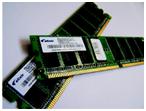
IN your PC or laptop, the hard drive is like a giant drawer or vault, where you store your files and folders. However, you do all your actual work at the RAM, which is the Random Access Memory. If the RAM is not large enough to accommodate all your work, then your system will slow down. A solution to this problem is that you should install more RAM in your system.

Archive ManagerArchive Manager
Feb 23, 2013, 11:48 am IST
inBharat
Follow on Google News
Facebook
Twitter
WhatsAppTelegramEmail


$img_titleAnoop Verma

IN your PC or laptop, the hard drive is like a giant drawer or vault, where you store your files and folders. However, you do all your actual work at the RAM, which is the Random Access Memory. If the RAM is not large enough to accommodate all your work, then your system will slow down. A solution to this problem is that you should install more RAM in your system. Your system should have RAM of at least 2GB. But for best results, you should have 4GB of RAM.

Getting more RAM
The installation of extra RAM is not a simple task. You have to decide the amount of extra RAM that you need and you also need to know the type of RAM that your system will accept. Most current desktop PCs use DDR3 memory, but some older systems use DDR2. The situation is similar with laptops. Check your manufacturer’s manual to find out which type of memory you need.

You can also find the RAM related details in your PC or laptop by going to the System Information Dialog Box. You can also go to the Control Panel for the same information. To open System Information, click Start, click All Programs, click Accessories, click System Tools, and then click System Information. In the left pane, select System Summary. The Installed Physical Memory (RAM) entry in the list tells you how much and what type of RAM your computer has.

In order to determine the maximum amount of RAM your computer can handle along with the speed, it is better that consult your PC or laptop’s owner manual. This will tell you about the number of slots (the place where you insert the RAM) your system has. It will also tell you about how much RAM your system can take and what is the maximum RAM your system can use. In general laptop motherboards support no more than two memory modules, although a few have three sockets.

Installation of RAM
While installing RAM, the first thing you need to do is ensure that your laptop or PC is unplugged from the power socket. Switch off the device and open the compartment where your RAM is installed. You might have to remove some screws to open the compartment. Laptop parts are generally very delicate and very small. You may need to use a screwdriver with a special head to remove the screws from the memory compartment.

Once the compartment is open, you will easily be able to locate the RAM cards that are already installed. You will also be able to locate the vacant slot or slots where you can install the new RAM.

You need to line up the notches of the new RAM card, and apply firm pressure to attach. To ensure you’re inserting the new RAM modules the right way round, align the key notch with the corresponding ridge in the memory socket. Once you are sure that the new RAM is firmly in place, you can close the latch at either end. If you have clips, they should snap back in place. After this you can reconnect all the cables, which you had removed for inserting the RAM.

You can leave the casing open until you are sure that the new RAM has been accepted, and your laptop or PC is working nicely.

Checking your computer
Turn on your computer and go to System Information Panel. Here you should see how much RAM you now have. If you initially had 1 GB of RAM and you have added 1 GB more, then now your system should show 2 GB. Hopefully, now your system will work with the kind of fast speed that you would like to have.


Share
Tweet
SendShareSend
✮ Subscribe Organiser YouTube Channel. ✮
✮ Join Organiser's WhatsApp channel for Nationalist views beyond the news. ✮
Previous News

Rising tide of Modi?s credibility

Next News

Poor writing can cost you a job opportunity

Related News

Shahzad Bhatti network added to UAPA terror list after security agencies bust alleged ISI-backed terror network

Centre designates ISI-backed Shahzad Bhatti network as terrorist organisation under UAPA over terror activities

BrahMos brings India’s high-speed strike capability into focus against Pakistan’s Chinese-made HQ-17AE

BrahMos vs HQ-17AE: How India’s missile strike power exposes cracks in Pakistan’s latest Chinese air defence shield

NSUI workers attacked ABVP members at Hari Mandir, with one person handed over to police

DUSU Elections: NSUI workers attack ABVP members at Hari Mandir residence in Delhi University; One detained

Representative Image

India reaffirms energy security of 1.4bn people amid US Sanctions on Russia Act; Flags tariff impact on bilateral ties

Maksood Ali, who hails from Siddharthnagar in Uttar Pradesh, was arrested on September 14

UP ATS arrested 19-year-old Maqsood Ali over Al-Qaeda links, Pakistan contacts and bomb-making videos

A representative image

Delhi HC asks centre about policy to regulate addictive social media features

Load More

Latest News

Shahzad Bhatti network added to UAPA terror list after security agencies bust alleged ISI-backed terror network

Centre designates ISI-backed Shahzad Bhatti network as terrorist organisation under UAPA over terror activities

BrahMos brings India’s high-speed strike capability into focus against Pakistan’s Chinese-made HQ-17AE

BrahMos vs HQ-17AE: How India’s missile strike power exposes cracks in Pakistan’s latest Chinese air defence shield

NSUI workers attacked ABVP members at Hari Mandir, with one person handed over to police

DUSU Elections: NSUI workers attack ABVP members at Hari Mandir residence in Delhi University; One detained

Representative Image

India reaffirms energy security of 1.4bn people amid US Sanctions on Russia Act; Flags tariff impact on bilateral ties

Maksood Ali, who hails from Siddharthnagar in Uttar Pradesh, was arrested on September 14

UP ATS arrested 19-year-old Maqsood Ali over Al-Qaeda links, Pakistan contacts and bomb-making videos

A representative image

Delhi HC asks centre about policy to regulate addictive social media features

Exhibition showcases PM Modi’s journey through art

PM Modi’s Birthday: Delhi exhibition showcases 76 paintings capturing 25 years of his public service journey

The resistance before liberation: Arya Samaj and the fight against the Razakars in Hyderabad

J&K BJP OBC Morcha presented 50,000 diyas to Sat Sharma under the ‘Aashirwad Ka Diya’ initiative to mark PM Modi’s birthday

PM Modi’s Birthday: J&K BJP OBC Morcha presents 50,000 diyas as part of ‘Aashirwad Ka Diya’ programme

A Representative Image

Chinese Telegram network, bank insider and Rs 12.84 crore fraud: How Delhi Police traced the corporate cybercrime trail

Load More
  • Privacy
  • Terms
  • Cookie Policy
  • Refund and Cancellation
  • Delivery and Shipping

© Bharat Prakashan (Delhi) Limited.
Tech-enabled by Ananthapuri Technologies

  • Home
  • Search Organiser
  • Bharat
    • Assam
    • Bihar
    • Chhattisgarh
    • Jharkhand
    • Maharashtra
    • View All States
  • World
    • Asia
    • Africa
    • North America
    • South America
    • Europe
    • Australia
  • Editorial
  • Operation Sindoor
  • Opinion
  • Analysis
  • Defence
  • Culture
  • Sports
  • Business
  • RSS @ 100
  • Entertainment
  • More ..
    • Sci & Tech
    • Vocal4Local
    • Special Report
    • Education
    • Employment
    • Books
    • Interviews
    • Travel
    • Health
    • Politics
    • Law
    • Economy
    • Obituary
  • Subscribe Magazine
  • Read Ecopy
  • Advertise
  • Circulation
  • Careers
  • About Us
  • Contact Us
  • Policies & Terms
    • Privacy Policy
    • Cookie Policy
    • Refund and Cancellation
    • Terms of Use

© Bharat Prakashan (Delhi) Limited.
Tech-enabled by Ananthapuri Technologies