
How to safeguard your Aadhaar: When to use a masked Aadhaar and how to download it
December 5, 2025
  • Read Ecopy
  • Circulation
  • Advertise
  • Careers
  • About Us
  • Contact Us
Android AppiPhone AppArattai
Organiser
  • ‌
  • Bharat
    • Assam
    • Bihar
    • Chhattisgarh
    • Jharkhand
    • Maharashtra
    • View All States
  • World
    • Asia
    • Europe
    • North America
    • South America
    • Africa
    • Australia
  • Editorial
  • International
  • Opinion
  • RSS @ 100
  • More
    • Op Sindoor
    • Analysis
    • Sports
    • Defence
    • Politics
    • Business
    • Economy
    • Culture
    • Special Report
    • Sci & Tech
    • Entertainment
    • G20
    • Azadi Ka Amrit Mahotsav
    • Vocal4Local
    • Web Stories
    • Education
    • Employment
    • Books
    • Interviews
    • Travel
    • Law
    • Health
    • Obituary
  • Subscribe
    • Subscribe Print Edition
    • Subscribe Ecopy
    • Read Ecopy
  • ‌
  • Bharat
    • Assam
    • Bihar
    • Chhattisgarh
    • Jharkhand
    • Maharashtra
    • View All States
  • World
    • Asia
    • Europe
    • North America
    • South America
    • Africa
    • Australia
  • Editorial
  • International
  • Opinion
  • RSS @ 100
  • More
    • Op Sindoor
    • Analysis
    • Sports
    • Defence
    • Politics
    • Business
    • Economy
    • Culture
    • Special Report
    • Sci & Tech
    • Entertainment
    • G20
    • Azadi Ka Amrit Mahotsav
    • Vocal4Local
    • Web Stories
    • Education
    • Employment
    • Books
    • Interviews
    • Travel
    • Law
    • Health
    • Obituary
  • Subscribe
    • Subscribe Print Edition
    • Subscribe Ecopy
    • Read Ecopy
Organiser
  • Home
  • Bharat
  • World
  • Operation Sindoor
  • Editorial
  • Analysis
  • Opinion
  • Culture
  • Defence
  • International Edition
  • RSS @ 100
  • Magazine
  • Read Ecopy
Home Bharat

How to safeguard your Aadhaar: When to use a masked Aadhaar and how to download it

In today's digital age, protecting your Aadhaar from fraud and misuse is crucial. Knowing when to use a masked Aadhaar and understanding how to download it can help keep your personal information safe. This guide explains how to use a masked Aadhaar effectively and provides simple steps to download it

WEBDESKWEBDESK
Aug 21, 2024, 10:30 pm IST
in Bharat
Follow on Google News
Representative image

Representative image

FacebookTwitterWhatsAppTelegramEmail

When you check into a hotel or enter a pub, you might need to prove who you are or how old you are. Aadhaar can be a useful document for this since it has your photo, address, email, and phone number. The staff doesn’t need to see your full Aadhaar number to verify your identity. In these cases, a masked Aadhaar can be handy because it hides the first eight digits of your number while still showing your address and other important details.

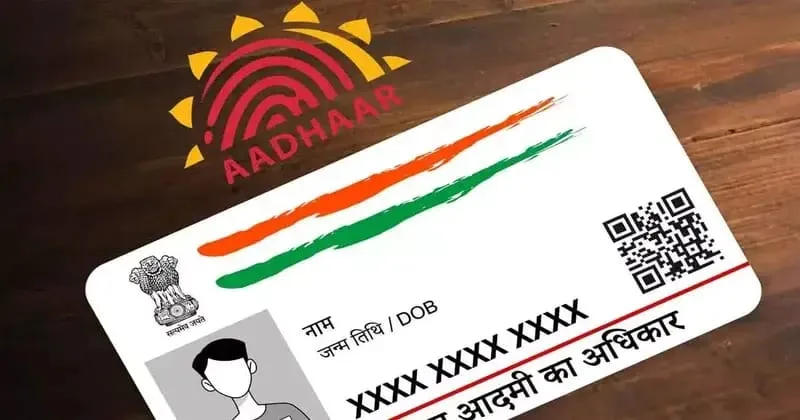
The “masked Aadhaar” option lets you hide part of your Aadhaar number in your downloaded e-Aadhaar. This means the first eight digits are replaced with “xxxx-xxxx,” and only the last four digits are shown, according to the Unique Identification Authority of India (UIDAI) on their website.

Where to use masked Aadhaar?

To keep your Aadhaar details safe, it’s important to know when to use a masked Aadhaar and when to provide the full Aadhaar number. According to UIDAI rules, only verified and licensed organisations can collect and keep your Aadhaar details for a specific purpose. Places like pubs, movie theatres, and hotels are not allowed to collect or store your Aadhaar. In these cases, you should use a masked Aadhaar. Hotels and pubs might ask for ID to check your age before serving things like alcohol. Since your date of birth is visible on a masked Aadhaar, you can use it to prove your age in these situations.

You can’t use a masked Aadhaar for KYC with a bank or insurance company. For example, if you’re opening a demat account and they need your Aadhaar number for verification, you have to provide the full Aadhaar number, not the masked one.

How to download masked Aadhaar?
Getting a masked Aadhaar is easy. Just follow these simple steps:

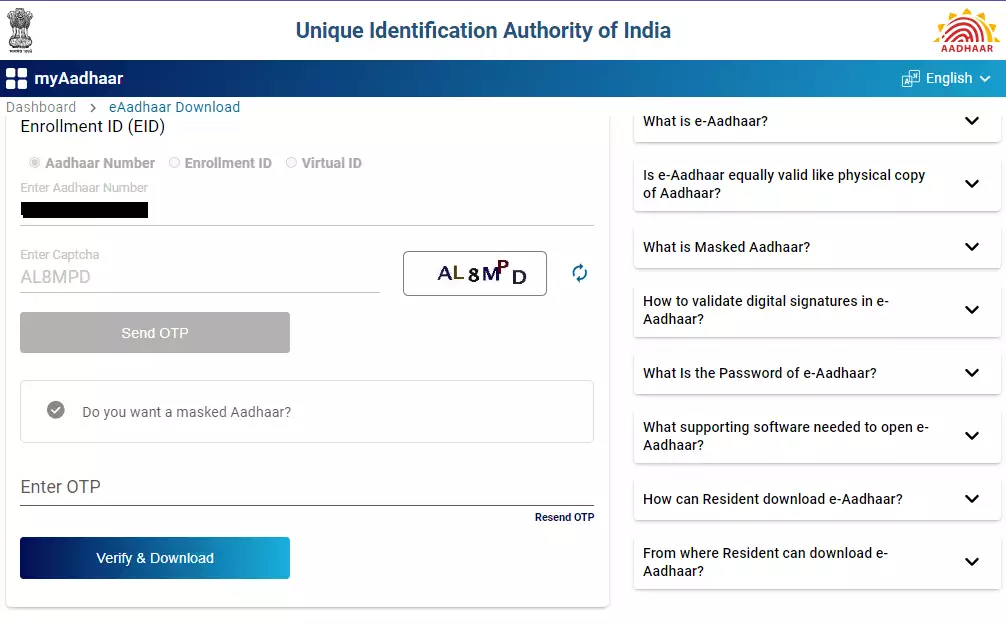
Step 1: Go to myaadhaar.uidai.gov.in.

Step 2: Enter your Aadhaar number, Enrolment ID, or virtual ID, complete the captcha, and then click the ‘Send OTP’ button
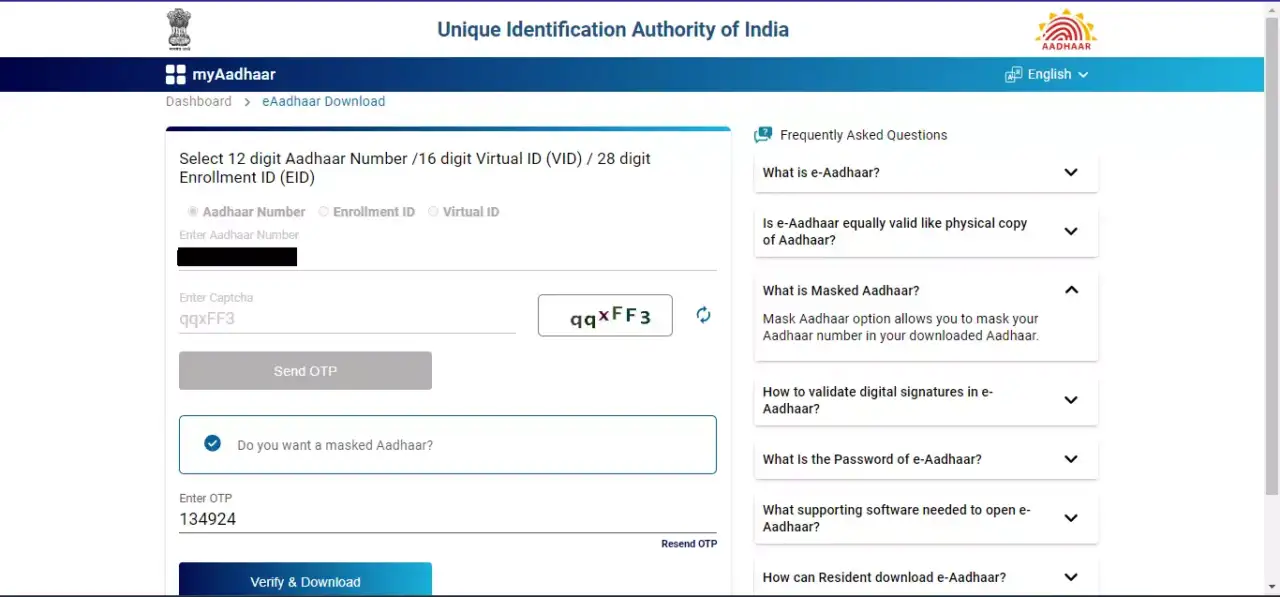
Step 3: A new button called ‘Do you want a masked Aadhaar?’ will appear on the same page. Click on that and then type in the OTP in the relevant box. Click ‘Verify and Download’ after that.
 

You can download your masked Aadhaar as a PDF file. To open the file, use a password that is your name in block letters followed by your birth year. The PDF will be digitally signed by UIDAI and will include a QR code that can be used to verify your Aadhaar.

Topics: AadhaarUnique Identification Authority of IndiaUIDAIMasked AadhaarMasked Aadhaar Card
Share20TweetSendShareSend
✮ Subscribe Organiser YouTube Channel. ✮
✮ Join Organiser's WhatsApp channel for Nationalist views beyond the news. ✮
Previous News

MHA writes to West Bengal Chief Secy for CISF deployment at RG Kar Medical College and Hospital in Kolkata

Next News

North Frontier Railway apprehended 225 Bangladeshi intruders while trying to travel to different parts of India

Related News

A representative image

UIDAI records 231 Crore Aadhaar authentication transactions in November, highest monthly total this financial year

Representative image

Database cleanup: UIDAI deactivates 2 crore Aadhaar numbers of deceased to stop misuse for subsidies & govt benefits

A representative image

Govt tightens MGNREGA monitoring: Aadhaar e-KYC to eliminate ghost workers and safeguard genuine labour

A representative image

Aadhaar not proof of citizenship, only identity: Election Commission tells Supreme Court

Supreme Court of India

SC says UIDAI cannot restrict Aadhaar use for voter lists, but rising frauds highlight valid concerns

Representative image

UIDAI data shows Kerala records 4.09 cr Aadhaar cards against a population of 3.6 cr, highlighting possible duplication

Load More

Comments

The comments posted here/below/in the given space are not on behalf of Organiser. The person posting the comment will be in sole ownership of its responsibility. According to the central government's IT rules, obscene or offensive statement made against a person, religion, community or nation is a punishable offense, and legal action would be taken against people who indulge in such activities.

Latest News

Thirupparankundram Karthigai Deepam utsav

Andhra Pradesh: AP Dy CM Pawan Kalyan reacts to Thirupparankundram row, flags concern over religious rights of Hindus

23rd India-Russia Annual Summit

India-Russia Summit heralds new chapter in time-tested ties: Inks MoUs in economic, defence, tourism & education

DGCA orders probe into IndiGo flight disruptions; Committee to report in 15 days

BJYM leader Shyamraj with Janaki

Kerala: Widow of BJP worker murdered in 1995 steps into electoral battle after three decades at Valancherry

Russian Sber bank has unveiled access to its retail investors to the Indian stock market by etching its mutual fund to Nifty50

Scripting economic bonhomie: Russian investors gain access to Indian stocks, Sber unveils Nifty50 pegged mutual funds

Petitioner S Vignesh Shishir speaking to the reporters about the Rahul Gandhi UK citizenship case outside the Raebareli court

Rahul Gandhi UK Citizenship Case: Congress supporters create ruckus in court; Foreign visit details shared with judge

(L) Kerala High Court (R) Bouncers in Trippoonithura temple

Kerala: HC slams CPM-controlled Kochi Devaswom Board for deploying bouncers for crowd management during festival

Fact Check: Rahul Gandhi false claim about govt blocking his meet with Russian President Putin exposed; MEA clears air

Union Minister for Road Transport and Highways Nitin Gadkari (Right)

India set for highway overhaul as Union Minister Nitin Gadkari unveils nationwide shift to MLFF electronic tolling

RSS Akhil Bharatiya Prachar Pramukh Shri Sunil Ambekar

When Narrative Wars result in bloodshed, countering them becomes imperative: Sunil Ambekar

Load More
  • Privacy
  • Terms
  • Cookie Policy
  • Refund and Cancellation
  • Delivery and Shipping

© Bharat Prakashan (Delhi) Limited.
Tech-enabled by Ananthapuri Technologies

  • Home
  • Search Organiser
  • Bharat
    • Assam
    • Bihar
    • Chhattisgarh
    • Jharkhand
    • Maharashtra
    • View All States
  • World
    • Asia
    • Africa
    • North America
    • South America
    • Europe
    • Australia
  • Editorial
  • Operation Sindoor
  • Opinion
  • Analysis
  • Defence
  • Culture
  • Sports
  • Business
  • RSS @ 100
  • Entertainment
  • More ..
    • Sci & Tech
    • Vocal4Local
    • Special Report
    • Education
    • Employment
    • Books
    • Interviews
    • Travel
    • Health
    • Politics
    • Law
    • Economy
    • Obituary
  • Subscribe Magazine
  • Read Ecopy
  • Advertise
  • Circulation
  • Careers
  • About Us
  • Contact Us
  • Policies & Terms
    • Privacy Policy
    • Cookie Policy
    • Refund and Cancellation
    • Terms of Use

© Bharat Prakashan (Delhi) Limited.
Tech-enabled by Ananthapuri Technologies