LibreOffice tips and tricks
December 7, 2025
  • Read Ecopy
  • Circulation
  • Advertise
  • Careers
  • About Us
  • Contact Us
Android AppiPhone AppArattai
Organiser
  • ‌
  • Bharat
    • Assam
    • Bihar
    • Chhattisgarh
    • Jharkhand
    • Maharashtra
    • View All States
  • World
    • Asia
    • Europe
    • North America
    • South America
    • Africa
    • Australia
  • Editorial
  • International
  • Opinion
  • RSS @ 100
  • More
    • Op Sindoor
    • Analysis
    • Sports
    • Defence
    • Politics
    • Business
    • Economy
    • Culture
    • Special Report
    • Sci & Tech
    • Entertainment
    • G20
    • Azadi Ka Amrit Mahotsav
    • Vocal4Local
    • Web Stories
    • Education
    • Employment
    • Books
    • Interviews
    • Travel
    • Law
    • Health
    • Obituary
  • Subscribe
    • Subscribe Print Edition
    • Subscribe Ecopy
    • Read Ecopy
  • ‌
  • Bharat
    • Assam
    • Bihar
    • Chhattisgarh
    • Jharkhand
    • Maharashtra
    • View All States
  • World
    • Asia
    • Europe
    • North America
    • South America
    • Africa
    • Australia
  • Editorial
  • International
  • Opinion
  • RSS @ 100
  • More
    • Op Sindoor
    • Analysis
    • Sports
    • Defence
    • Politics
    • Business
    • Economy
    • Culture
    • Special Report
    • Sci & Tech
    • Entertainment
    • G20
    • Azadi Ka Amrit Mahotsav
    • Vocal4Local
    • Web Stories
    • Education
    • Employment
    • Books
    • Interviews
    • Travel
    • Law
    • Health
    • Obituary
  • Subscribe
    • Subscribe Print Edition
    • Subscribe Ecopy
    • Read Ecopy
Organiser
  • Home
  • Bharat
  • World
  • Operation Sindoor
  • Editorial
  • Analysis
  • Opinion
  • Culture
  • Defence
  • International Edition
  • RSS @ 100
  • Magazine
  • Read Ecopy
Home General

LibreOffice tips and tricks

Archive ManagerArchive Manager
Apr 20, 2013, 12:00 am IST
in General
Follow on Google News
FacebookTwitterWhatsAppTelegramEmail

Anoop Verma

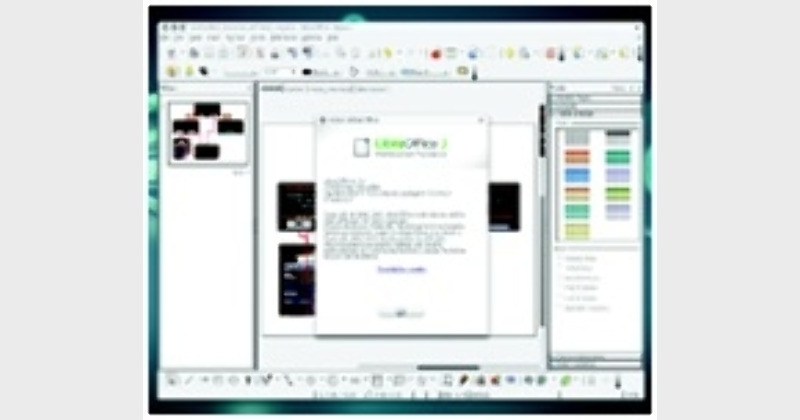
LibreOffice has now become one of the most popular Office software for people who are looking for an alternative to Microsoft office. Here are few handy tips and tricks that you can use with LibreOffice. While these tips will not make you a better writer, they will surely make the process of writing in one form or another a lot easier.

WHEN it comes to Office Software, Microsoft Office is the software of choice. But the reign of Microsoft may not last forever, as many new power-packed Office Programmes have now become available.  The best thing about these Office Programmes is that they are free. In fact, if users  realises how good these free Office Software are, they would be amazed at what all they are missing.
LibreOffice has now become one of the most popular office software for people who are looking for an alternative to Microsoft office. Here are few handy tips and tricks that you can use with LibreOffice. While these tips will not make you a better writer, they will surely make the process of writing in one form or another a lot easier.

Improve the speed of LibreOffice

For improving the speed you can use the option of disabling Java. Go to Tools, Options and select the Java entry on the left. Here you can uncheck the option to ‘Use a Java runtime environment’ and restart the software. But you have to keep in mind that change can affect databases and some of the wizards, but is easily re-enabled if you run into problems.

Easy way to create hyperlinks

At times we need to incorporate hyperlinks in the articles that we are writing. This can prove to be quite cumbersome, as you may have to type the text, click on the Hyperlink button, enter the URL, click Apply, and click Close. This task can become much easier if you use the Hyperlink Bar. To enable this, click View and then go to Toolbars. Here you can select Hyperlink Bar. This will open a new toolbar that has two simple text areas. The first (to the far left) is where you enter the text for the hyperlink. The second area is where you enter the URL. Once you’ve entered the URL, press Enter and the link will appear to the right of the current cursor position.

Make use of the thesaurus

The LibreOffice software comes with a handy Thesaurus. In order to open this tool, you need to highlight the word and then hit Ctrl + F7. The LibreOffice Thesaurus will open with suggestions for the word. If you are using a window manager or have created a custom shortcut that uses Ctrl + F7, you can just go to Tools and then to Language and then Thesaurus.

Learn about the keyboard shortcuts

LibreOffice comes with a whole range of shortcuts. All of us know about the Ctrl+A, Ctrl+V and Ctrl+P shortcuts. Other than this there is a huge list. In order to learn about this list, you have to click Tools go to Customise and then click on the Keyboard Tab. Here you will have the opportunity to scroll through the entire list of pre-configured keyboard shortcuts.

Protect your templates

There exists a great system of using templates in LibreOffice. You can create a collection of them and house them in a shared repository. But when you create them, it’s a good idea to make them read-only and to password protect them. The last thing you want to do is work hard on a template only to have someone overwrite it, causing you to go back to the drawing board.

Perform quick calculations

Normally we do our calculations on spreadsheets. But LibreOffice writer too has a resource for calculations. The formula toolbar does not reside permanently in the toolbar section of LibreOffice. All you need to do is view the toolbar, run your calculation, hit Enter and the calculation will appear at your cursor.

ShareTweetSendShareSend
✮ Subscribe Organiser YouTube Channel. ✮
✮ Join Organiser's WhatsApp channel for Nationalist views beyond the news. ✮
Previous News

?Madhya Pradesh should become role model for country?

Next News

Congress in a soup over misuse of CBI

Related News

The doctrine of Geeta diplomacy

The Doctrine of Gita Diplomacy: Culture, strategy and the evolving global connect of India

Defence Minister Rajnath Singh speaks post inaugurating the infrastructure projects of BRO in Leh

Defence Minister Rajnath Singh hails the role of BRO in revolutionising communication & connectivity in border regions

Dismantling the threat of white-collar terrorism

The white terror module and the need for de-radicalisation of campuses

Lok Sabha to hold special discussion on 150 years of Vande Mataram

150 years of Vande Mataram: Winter session of Lok Sabha to hold special discussion on Dec. 8; PM Modi to address

India is marching towards Atmanirbharta in defence

Atmanirbharta in Defence: India’s defence manufacturing takes off

Defence Minister Rajnath Singh extends greetings on the occasion of Armed Forces Flag Day

Defence Minister Rajnath Singh extends greetings on Armed Forces Flag Day; Urges people to donate to AFFD Fund

Load More

Comments

The comments posted here/below/in the given space are not on behalf of Organiser. The person posting the comment will be in sole ownership of its responsibility. According to the central government's IT rules, obscene or offensive statement made against a person, religion, community or nation is a punishable offense, and legal action would be taken against people who indulge in such activities.

Latest News

The doctrine of Geeta diplomacy

The Doctrine of Gita Diplomacy: Culture, strategy and the evolving global connect of India

Defence Minister Rajnath Singh speaks post inaugurating the infrastructure projects of BRO in Leh

Defence Minister Rajnath Singh hails the role of BRO in revolutionising communication & connectivity in border regions

Dismantling the threat of white-collar terrorism

The white terror module and the need for de-radicalisation of campuses

Lok Sabha to hold special discussion on 150 years of Vande Mataram

150 years of Vande Mataram: Winter session of Lok Sabha to hold special discussion on Dec. 8; PM Modi to address

India is marching towards Atmanirbharta in defence

Atmanirbharta in Defence: India’s defence manufacturing takes off

Defence Minister Rajnath Singh extends greetings on the occasion of Armed Forces Flag Day

Defence Minister Rajnath Singh extends greetings on Armed Forces Flag Day; Urges people to donate to AFFD Fund

Representative Image

SIR for protecting the health of democracy

Dr. S. Jaishankar,
Minister of External Affairs of India

EAM Jaishankar expresses optimism as India US trade deal moves closer to agreement

Swadeshi strategy emerges key to closing Bharat’s Rs 8.36 lakh crore trade gap

Defence Minister Rajnath Singh

Defence Minister Rajnath Singh to inaugurate125 strategic BRO projects during visit to Leh

Load More
  • Privacy
  • Terms
  • Cookie Policy
  • Refund and Cancellation
  • Delivery and Shipping

© Bharat Prakashan (Delhi) Limited.
Tech-enabled by Ananthapuri Technologies

  • Home
  • Search Organiser
  • Bharat
    • Assam
    • Bihar
    • Chhattisgarh
    • Jharkhand
    • Maharashtra
    • View All States
  • World
    • Asia
    • Africa
    • North America
    • South America
    • Europe
    • Australia
  • Editorial
  • Operation Sindoor
  • Opinion
  • Analysis
  • Defence
  • Culture
  • Sports
  • Business
  • RSS @ 100
  • Entertainment
  • More ..
    • Sci & Tech
    • Vocal4Local
    • Special Report
    • Education
    • Employment
    • Books
    • Interviews
    • Travel
    • Health
    • Politics
    • Law
    • Economy
    • Obituary
  • Subscribe Magazine
  • Read Ecopy
  • Advertise
  • Circulation
  • Careers
  • About Us
  • Contact Us
  • Policies & Terms
    • Privacy Policy
    • Cookie Policy
    • Refund and Cancellation
    • Terms of Use

© Bharat Prakashan (Delhi) Limited.
Tech-enabled by Ananthapuri Technologies